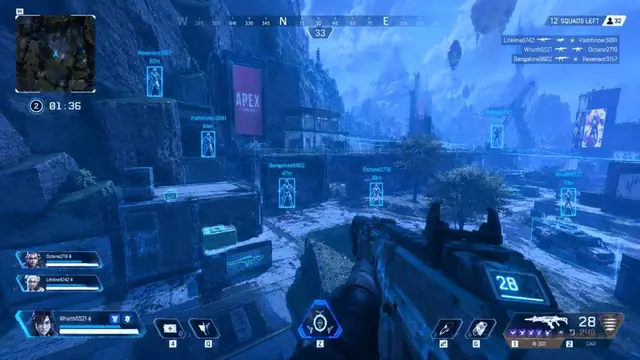
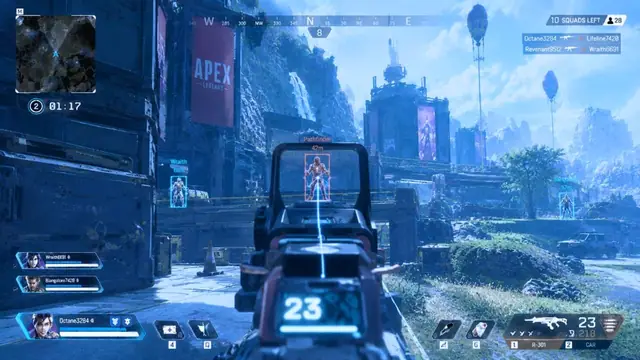
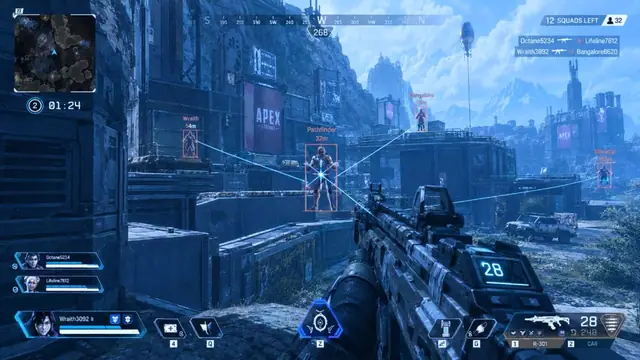
Players use “wallhack” and “ESP” interchangeably, but they are not the same job. On APEX HACK, wallhack emphasizes through-cover silhouettes, while player ESP focuses on readable boxes, health, and distance.
What player ESP is for
Player ESP answers “who, where, how healthy?” Boxes, health bars, and distance tags help you rotate and decide peeks. ESP can work without full x-ray if you keep opacity low.
What wallhack adds
Wallhack pushes visibility through geometry—skeletons or fills behind walls. It is strongest for holding angles and pre-aiming doors, and noisiest when every silhouette is bright.
When to use both
- Ranked holds: thin ESP boxes + light wallhack skeletons
- POI clears: ESP distance + loot ESP, wallhack only on push
- Ranked pubs practice: ESP only until your eyes adjust
Clutter kills fights
Turning every vision module on at once hides information. Prefer one accent color, limited distance range, and lower opacity when wallhack is active.
Loot is a separate layer—see loot ESP. Keep loot filters strict so weapon glow does not bury enemy boxes.
Related reading
Tune overlays with ESP settings, then aimbot FOV. Creators should also read stream-safe OBS.
Extra practical notes
A simple rule: if you cannot name why a module is on, turn it off for the next game. Vision tools should answer a question, not decorate the HUD.
Practice “ESP only” sessions so you learn distance tags without leaning on wall outlines. Then add wallhack for one POI type (buildings vs open ground) and compare results.
Shop modules from the APEX HACK hub when you know which vision stack you actually use.
Skeleton wallhack often reads cleaner than filled boxes through dense geometry. If your menu offers both, test skeletons first at low opacity.
Squad colors matter. Miscolored ESP causes friendly fire mistakes faster than any other setting. Confirm ally colors before ranked.
After patches, vision offsets can drift. If boxes float off models, wait for a Ready status update instead of compensating with huge FOV aimbot.
For content creators, wallhack is the module most likely to leak on capture if stream-proof is off—verify locally before going live.
Write down two presets: “info light” (ESP) and “hold heavy” (ESP + wallhack). Switching mid-match beats rebuilding sliders in the dropship.
Take notes while you test wallhack vs esp settings so you can restore a known-good preset after an Apex update without guessing.
Change one control at a time, play two full games, then decide whether the change helped. Stacking five slider moves in one night makes debugging impossible.
Use the firing range for mechanical checks and pubs for chaos checks. Ranked should inherit only presets that already survived both.
If a setting feels strong in the range but weak in real fights, your issue is usually movement, FOV, or information clutter—not a need for maximum strength.
Keep Windows updated, close unused overlays, and confirm the live status banner before you attribute a bad session to a single module.
When something breaks after a driver update, roll back the last change you made before you wipe the entire config.
Share settings with context: DPI, sens, and which modules were enabled. A bare number without context is not a preset.
Treat support replies as part of your notes. If a fix worked, write the exact steps so you do not re-learn them next season.
Avoid absolute claims about detection or bans. Focus on controllable habits: status checks, calm defaults, and capture tests for creators.
Revisit your presets every few weeks even without a patch. Your own playstyle drifts, and last month’s FOV may no longer match how you peek.
A short cool-down between big config changes prevents tilt-driven decisions. If a night goes badly, stop editing and finish with a known-safe preset.
Bookmark the module pages you actually use so you are not browsing the whole catalog mid-session when you only need one checklist.
If you play on multiple machines, sync notes—not only files. A copied config on different hardware can feel wrong for mundane DPI reasons.
Creators should separate “practice config” and “stream config.” Mixing them is how overlays leak into a VOD you cannot edit fast enough.
End each tuning session by writing one sentence: what improved, what still feels off, and what you will test next. That sentence is worth more than another random slider nudge.
Take notes while you test wallhack vs esp settings so you can restore a known-good preset after an Apex update without guessing.
Change one control at a time, play two full games, then decide whether the change helped. Stacking five slider moves in one night makes debugging impossible.
Use the firing range for mechanical checks and pubs for chaos checks. Ranked should inherit only presets that already survived both.
If a setting feels strong in the range but weak in real fights, your issue is usually movement, FOV, or information clutter—not a need for maximum strength.
Keep Windows updated, close unused overlays, and confirm the live status banner before you attribute a bad session to a single module.
When something breaks after a driver update, roll back the last change you made before you wipe the entire config.
Share settings with context: DPI, sens, and which modules were enabled. A bare number without context is not a preset.
Treat support replies as part of your notes. If a fix worked, write the exact steps so you do not re-learn them next season.